
设置
概述
The settings allow you to manage the configuration of your project.
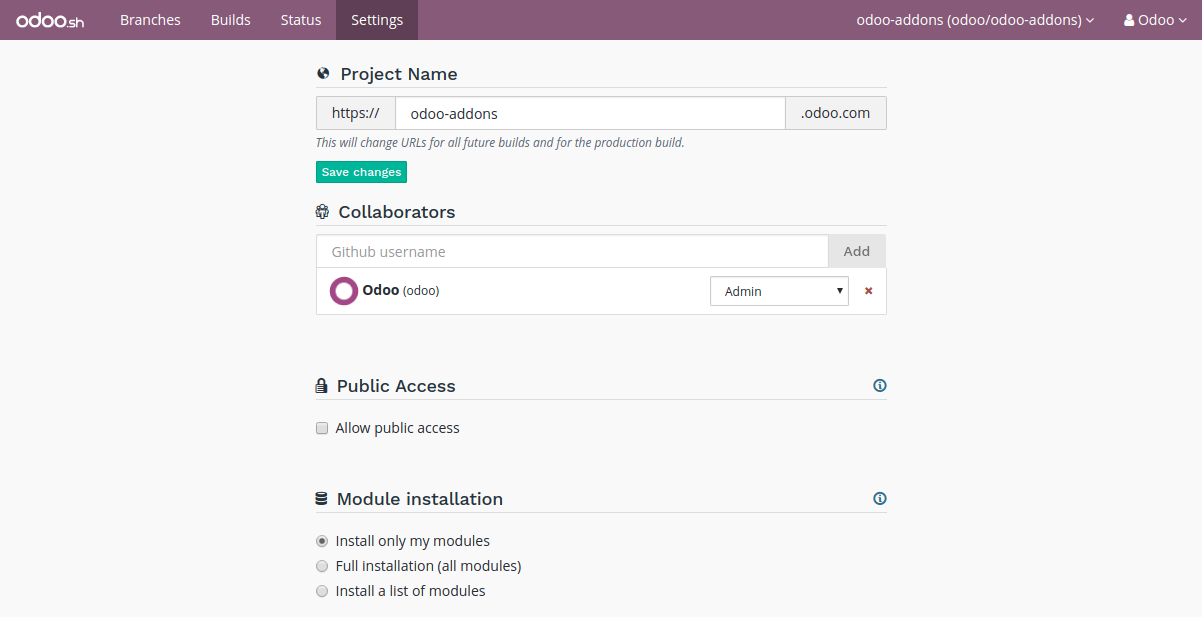
项目名称
The name of your project.

This defines the address that will be used to access your production database.
Addresses of your staging and development builds are derived from this name and assigned automatically. However, when you change your project name, only future builds will use the new name.
合作者
Manage the Github users who can access your project.

There are three levels of users:
Admin: has access to all features of an Odoo.sh project.
Tester: has access to the Staging and Development databases and their tooling. This role is for users conducting User Acceptance Tests. Testers can work with copies of production data but cannot access the production database through the Odoo.sh tooling.
Developer: has access only to the Development databases and their tooling. This role is for developers who propose code modifications but are not allowed to access production and staging databases through the Odoo.sh tooling.
开发者 |
测试人 |
管理员 |
||
|---|---|---|---|---|
开发 |
历史 |
● |
● |
● |
1-click connect |
● |
● |
● |
|
日志 |
● |
● |
● |
|
Shell/SSH |
● |
● |
● |
|
邮件 |
● |
● |
● |
|
设置 |
● |
● |
● |
|
暂存 |
历史 |
● |
● |
● |
1-click connect |
● |
● |
||
日志 |
● |
● |
||
Shell/SSH |
● |
● |
||
邮件 |
● |
● |
||
Monitoring |
● |
● |
||
备份 |
● |
|||
升级 |
● |
● |
||
设置 |
● |
● |
||
生产 |
历史 |
● |
● |
● |
1-click connect |
● |
|||
日志 |
● |
|||
Shell/SSH |
● |
|||
邮件 |
● |
|||
Monitoring |
● |
|||
备份 |
● |
|||
升级 |
● |
|||
设置 |
● |
|||
状态 |
● |
● |
● |
|
设置 |
● |
警告
Those roles only apply to the usage of Odoo.sh. It is important to reflect the user roles attribution within the repository on GitHub. Please refer to the GitHub documentation section on Managing a branch protection rule for detailed guidance.
Public Access
Allow public access to your development builds.

If activated, this option exposes the Builds page publicly, allowing visitors to view logs of development builds.
Production and staging builds are excluded, visitors can only see their status.
GitHub 提交状态
This option enables Odoo.sh to push commit statuses to your GitHub repository when a build is created or updated. It requires a GitHub token with permissions to push commit statuses to the repository. Refer to GitHub’s documentation on personal access tokens for instructions to create yours.
注解
GitHub’s fine-grained personal tokens have an expiration date and will be disabled if they fail to update the commit status. You can replace the token at any time on Odoo.sh.
The commit statuses pushed to GitHub can have the following contexts:
ci/odoo.sh (dev): status of a development build
ci/odoo.sh (staging): status of a staging build
ci/odoo.sh (production): status of a production build
ci/odoo.sh (test_ci): testing the token from the Settings page will push a test status on the last commit of your repository
自定义域
To configure additional domains please refer to the corresponding branch’s settings tab.
子模块
Configure the deploy keys for the private repositories you use as submodules in your branches to allow Odoo.sh to download them.
警告
These settings are required for private repositories only. If you are looking on how to set up your submodules, instructions are available in the chapter Submodules of this documentation.

When a repository is private, it is not possible to publicly download its branches and revisions. For that reason, you need to configure a deploy key for Odoo.sh, so the remote Git server allows our platform to download the revisions of this private repository.
To configure the deploy key for a private repository, proceed as follows:
in the input, paste the SSH URL of your private sub-repository and click on Add,
e.g. git@github.com:USERNAME/REPOSITORY.git
it can be another Git server than Github, such as Bitbucket, Gitlab or even your own self-hosted server
copy the public key,
it should look like ssh-rsa some…random…characters…here…==
in the settings of the private sub-repository, add the public key amongst the deploy keys.
Github.com:
Bitbucket.com:
Gitlab.com:
Self-hosted: append the key to the git user’s authorized_keys file in its .ssh directory
Storage Size
This section shows the storage size used by your project.

Storage size is computed as follows:
the size of the PostgreSQL database
the size of the disk files available in your container: database filestore, sessions storage directory…
警告
In case you want to analyze disk usage, you can run the tool ncdu in your Web Shell.
Should your production database size grow to exceed what’s provisioned in your subscription, it will automatically be synchronized with it.
Database Workers
Additional database workers can be configured here. More workers help increase the load your production database is able to handle. If you add more, it will automatically be synchronized with your subscription.

警告
Adding more workers will not magically solve all performance issues. It only allows the server to handle more connections at the same time. If some operations are unusually slow, it’s most likely a problem with the code, if it’s not due to your own customizations you can open a ticket here.
Staging Branches
Additional staging branches allow you to develop and test more features at the same time. If you add more, it will automatically be synchronized with your subscription.

启用
Shows the status of the project’s activation. You can change the project’s activation code if needed.
