Skip to Content
Odoo Menu
  • Log ind
  • Prøv gratis
  • Apps
    Økonomi
    • Bogføring
    • Fakturering
    • Udgifter
    • Regneark (BI)
    • Dokumenter
    • e-Signatur
    Salg
    • CRM
    • Salg
    • POS Butik
    • POS Restaurant
    • Abonnementer
    • Udlejning
    Hjemmeside
    • Hjemmesidebygger
    • e-Handel
    • Blog
    • Forum
    • LiveChat
    • e-Læring
    Forsyningskæde
    • Lagerbeholdning
    • Produktion
    • PLM
    • Indkøb
    • Vedligeholdelse
    • Kvalitet
    HR
    • Medarbejdere
    • Rekruttering
    • Fravær
    • Medarbejdersamtaler
    • Anbefalinger
    • Flåde
    Marketing
    • Markedsføring på sociale medier
    • E-mailmarketing
    • SMS-marketing
    • Arrangementer
    • Automatiseret marketing
    • Spørgeundersøgelser
    Tjenester
    • Projekt
    • Timesedler
    • Udkørende Service
    • Kundeservice
    • Planlægning
    • Aftaler
    Produktivitet
    • Dialog
    • Godkendelser
    • IoT
    • VoIP
    • Vidensdeling
    • WhatsApp
    Tredjepartsapps Odoo Studio Odoo Cloud-platform
  • Brancher
    Detailhandel
    • Boghandel
    • Tøjforretning
    • Møbelforretning
    • Dagligvarebutik
    • Byggemarked
    • Legetøjsforretning
    Mad og værtsskab
    • Bar og pub
    • Restaurant
    • Fastfood
    • Gæstehus
    • Drikkevareforhandler
    • Hotel
    Ejendom
    • Ejendomsmægler
    • Arkitektfirma
    • Byggeri
    • Ejendomsadministration
    • Havearbejde
    • Boligejerforening
    Rådgivning
    • Regnskabsfirma
    • Odoo-partner
    • Marketingbureau
    • Advokatfirma
    • Rekruttering
    • Audit & certificering
    Produktion
    • Tekstil
    • Metal
    • Møbler
    • Fødevareproduktion
    • Bryggeri
    • Firmagave
    Heldbred & Fitness
    • Sportsklub
    • Optiker
    • Fitnesscenter
    • Kosmetolog
    • Apotek
    • Frisør
    Håndværk
    • Handyman
    • IT-hardware og support
    • Solenergisystemer
    • Skomager
    • Rengøringsservicer
    • VVS- og ventilationsservice
    Andet
    • Nonprofitorganisation
    • Miljøagentur
    • Udlejning af billboards
    • Fotografi
    • Cykeludlejning
    • Softwareforhandler
    Gennemse alle brancher
  • Community
    Få mere at vide
    • Tutorials
    • Dokumentation
    • Certificeringer
    • Oplæring
    • Blog
    • Podcast
    Bliv klogere
    • Udannelselsesprogram
    • Scale Up!-virksomhedsspillet
    • Besøg Odoo
    Få softwaren
    • Download
    • Sammenlign versioner
    • Udgaver
    Samarbejde
    • Github
    • Forum
    • Arrangementer
    • Oversættelser
    • Bliv partner
    • Tjenester til partnere
    • Registrér dit regnskabsfirma
    Modtag tjenester
    • Find en partner
    • Find en bogholder
    • Kontakt en rådgiver
    • Implementeringstjenester
    • Kundereferencer
    • Support
    • Opgraderinger
    Github Youtube Twitter LinkedIn Instagram Facebook Spotify
    +1 (650) 691-3277
    Få en demo
  • Prissætning
  • Hjælp

Odoo is the world's easiest all-in-one management software.
It includes hundreds of business apps:

  • CRM
  • e-Commerce
  • Bogføring
  • Lager
  • PoS
  • Projekt
  • MRP
All apps
Du skal være registreret for at interagere med fællesskabet.
All Posts People Emblemer
Tags (View all)
odoo accounting v14 pos v15
Om dette forum
Du skal være registreret for at interagere med fællesskabet.
All Posts People Emblemer
Tags (View all)
odoo accounting v14 pos v15
Om dette forum
Hjælp

Studio Automations ? for the non-programmer

Tilmeld

Få besked, når der er aktivitet på dette indlæg

Dette spørgsmål er blevet anmeldt
studioautomation
4 Besvarelser
4953 Visninger
Avatar
Monica MG

Hi everyone, Am I close here on getting a field to update with today's day upon a record change?

I have an added field "Date of Last Contact" that I would like updated with todays date, if either conditions are met:

A) Chatter is updated

B) Record Changed 

(assuming those are not the same, if they are, great)

Under Automations, create a new with these conditions

> Model = Contact

> Trigger = after last update

> Open: Actions

>> Update Record

>> Action Details - DATE OF LAST CONTACT to write_date

I've tried 

date

=datetime.today()

datetime.today()  

datetime.today

& a whole other bunch of combinations. I know it can take some time to run the automation, not sure if I'm not patient enough. 

Any help is appreciated.


1
Avatar
Kassér
Avatar
Chris TRINGHAM
Bedste svar

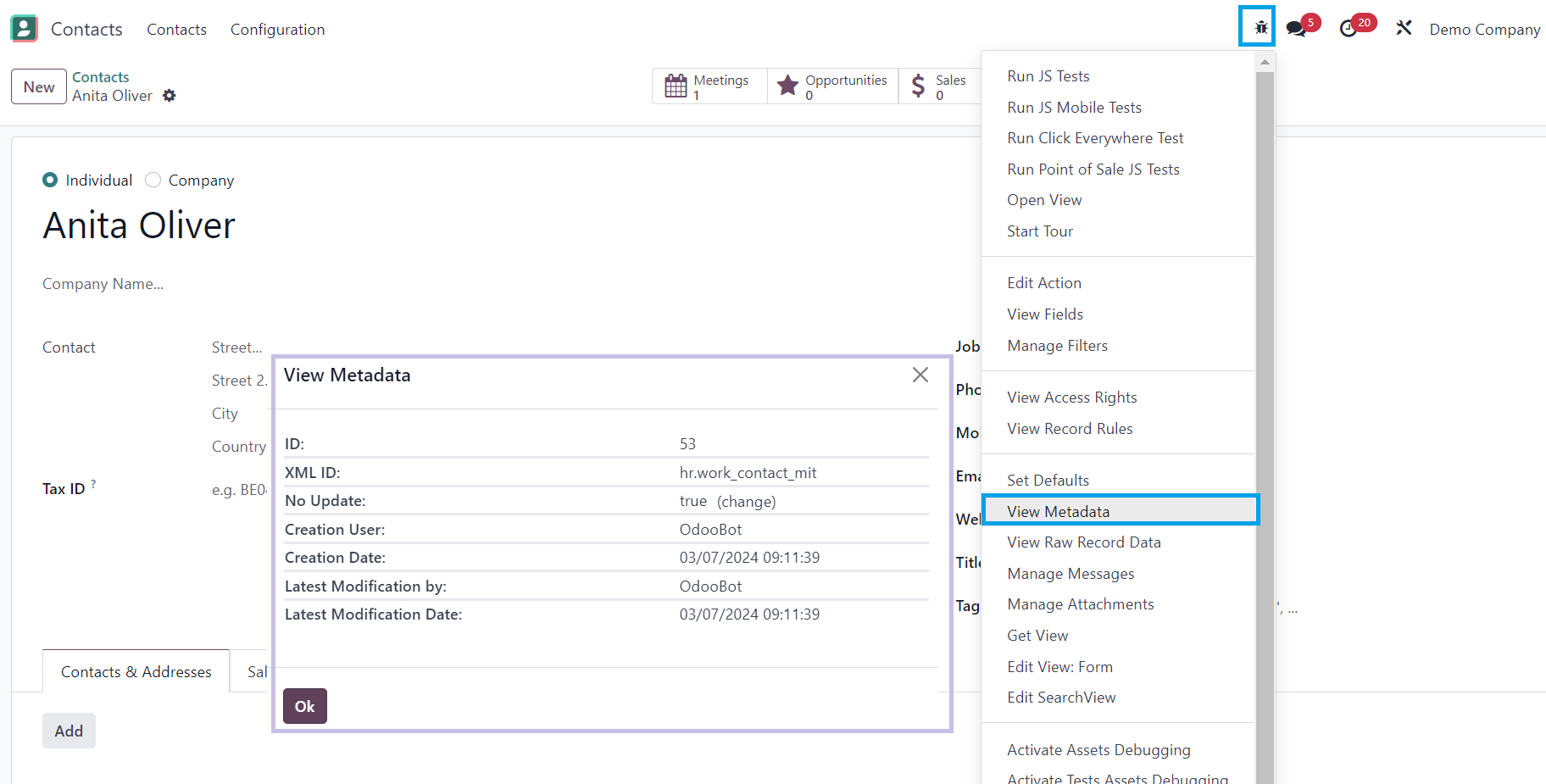
Hi Monica - if you want to know when the record was last updated, that is already there, as can be seen in the Metadata (in developer mode):

The field is write_date and it's easy to make that visible on the Contact.


Adding a note in the chatter will not changed the last updated date.

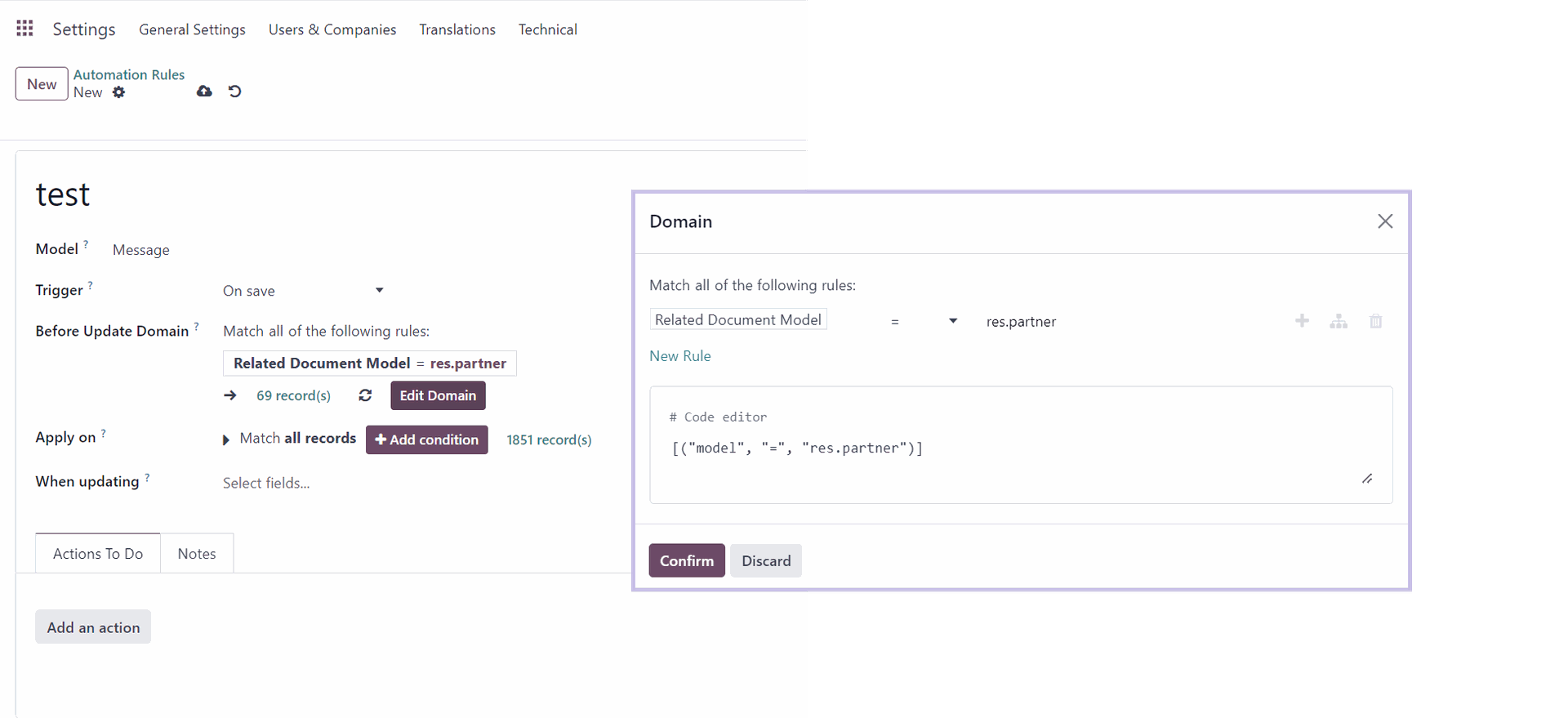
If you want to capture the last date when a note was logged, your Automation Rule has to run against the Message database table

but that's going to require some Python code to update the date on the Contact.


Which version of Odoo?  If it's 17 you can still select the "On Save" trigger - rather than "after last update":

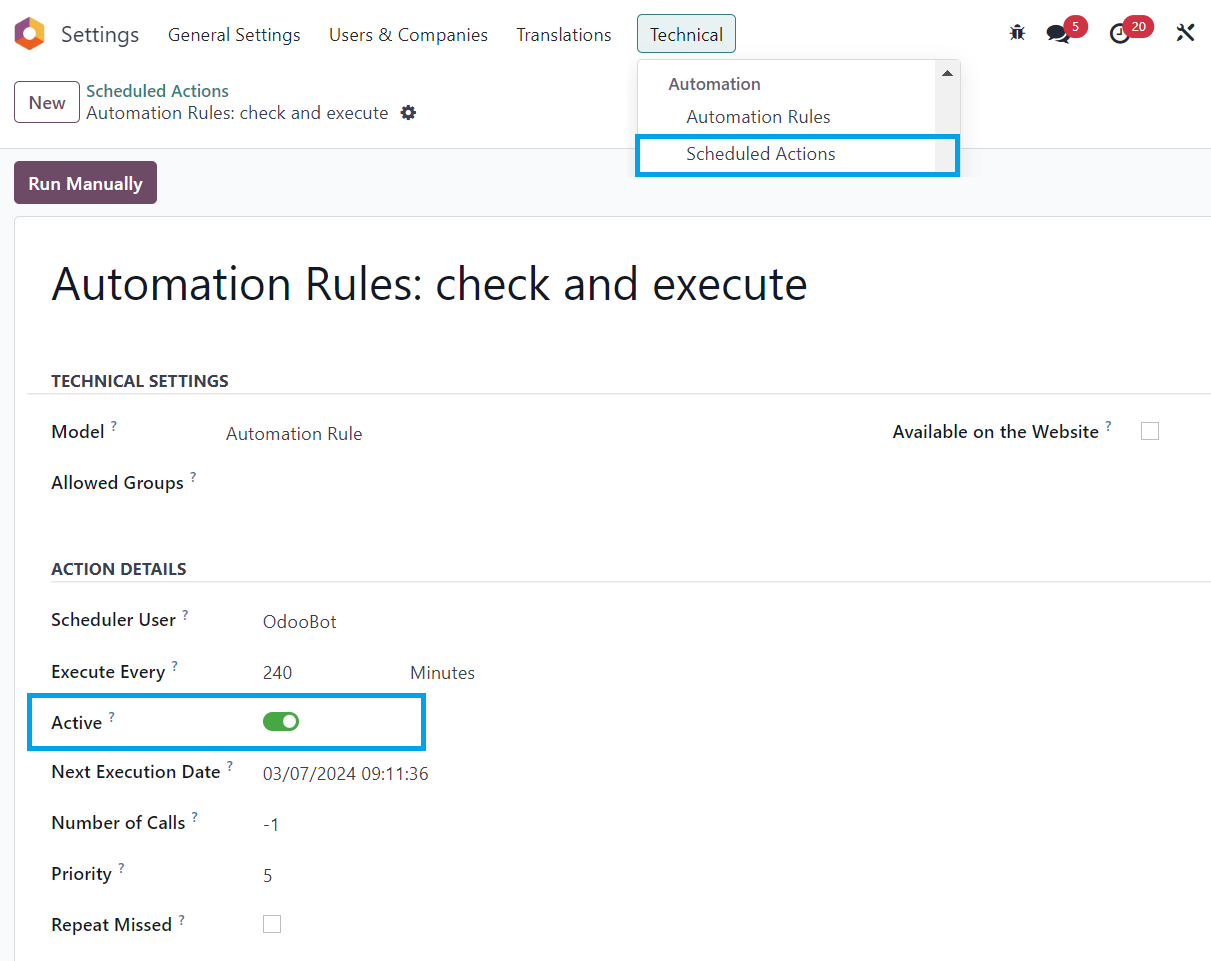
That will update immediately rather waiting up to 4 hours.


Also, you can also check if the Scheduled Action is running (to process Automated Rules):

1
Avatar
Kassér
Monica MG
Forfatter

Well I tried everything and can't get this to work. So very frustrated. I don't know if it's possible to pay to get someone to get this to work. My goal for CRM is this: Bring in quality leads, nurture them. Get triggers on when to nurture, and keep the relationship going. It's not just a safety net, but a way to manage and to know when to reach out. Today I have to snooze, task list, or calendar when to reach out, and it's neither ideal, nor scalable. If I miss a snooze, they fall off my radar = no bueno. I need Odoo to let me know, when it's time to reach out. I found this link does a great job of describing what I am looking for: https://www.insightdata.co.uk/news/crm-inactivity-alerts/

Avatar
Monica MG
Forfatter Bedste svar

Here is the Answer for [B],  Chris TRINGHAM got me part way there. Here's the step by step on how to create a field that reflects the last date the record was updated, with no coding. 

[A] To display the write_date field in the Odoo Contact record using Odoo Studio:

  1. Enable developer mode (field won't be visible if this step is skipped)
    1. Main Menu, Settings, General Settings, at the bottom - check the enable developer mode.
    2. A laddy bug icon appears at the top right menu bar 
  2. Navigate to the Contact module
  3. Open one of your contacts, doesn't matter which one
  4. Open Odoo Studio: Click on the Odoo Studio icon (looks like a crossed pen and wrench icon) in the top bar.
  5. This is the form view. To add the write_date field, click on the area where you want to add the write_date field. A sidebar should appear on the right. at the right botton, click on Add an Existing Field 
  6. search for write_date. 
  7. Click on it, and drag it to where you want to add it to your form.
  8. Save, go back to contacts, enter in the contact and you see a date.
  9. Change something and it changes the date right away.

I'll update this when I figure out how to get the chatter to update another field.  


0
Avatar
Kassér
Monica MG
Forfatter

This post, helps get around this, on what I was ultimately trying to do.
https://www.odoo.com/forum/help-1/need-program-coding-support-for-customer-inactivity-report-filter-251951

Avatar
Cybrosys Techno Solutions Pvt.Ltd
Bedste svar

Hi Monica,

When creating a new automation try this to reach your requirements

1) Model: your_model

2) Trigger: On Save

3) When Updating: Select all fields if needed

4) Create an action with type "Execute Python Code" and write Python code to set the value for your last updated datetime field.

This format provides clear instructions for setting up a model trigger in a system, specifying the actions to take upon saving and detailing the steps to execute Python code for updating a DateTime field


Hope it helps

0
Avatar
Kassér
Avatar
Ray Carnes (ray)
Bedste svar
datetime.date.today()

or

datetime.datetime.now()


0
Avatar
Kassér
Monica MG
Forfatter

Thanks Ray!! I just put in the second datetime.datetime.now(), saved, refreshed - then went to a contact and made a change. I went to another and put in a log note. I'll wait a few hours and report back.

Monica MG
Forfatter

Both ways didn't work. This is shared cloud instance. Frustrating....

Enjoying the discussion? Don't just read, join in!

Create an account today to enjoy exclusive features and engage with our awesome community!

Tilmeld dig
Related Posts Besvarelser Visninger Aktivitet
Documentation on Studio Automation
studio automation
Avatar
Avatar
1
feb. 19
5092
Execute code complete field with input date + X days
studio automation execute code
Avatar
Avatar
1
jan. 25
2187
Can't automzatize a task via studio Løst
automatic_email studio automation
Avatar
Avatar
2
jun. 23
3530
Studio V18 Domain does not have current field
studio
Avatar
Avatar
1
dec. 25
377
debit and credit in currency
studio
Avatar
Avatar
1
nov. 25
2339
Community
  • Tutorials
  • Dokumentation
  • Forum
Open Source
  • Download
  • Github
  • Runbot
  • Oversættelser
Tjenester
  • Odoo.sh-hosting
  • Support
  • Opgradere
  • Individuelt tilpasset udvikling
  • Uddannelse
  • Find en bogholder
  • Find en partner
  • Bliv partner
Om os
  • Vores virksomhed
  • Brandaktiver
  • Kontakt os
  • Stillinger
  • Arrangementer
  • Podcast
  • Blog
  • Kunder
  • Juridiske dokumenter • Privatlivspolitik
  • Sikkerhedspolitik
الْعَرَبيّة Català 简体中文 繁體中文 (台灣) Čeština Dansk Nederlands English Suomi Français Deutsch हिंदी Bahasa Indonesia Italiano 日本語 한국어 (KR) Lietuvių kalba Język polski Português (BR) română русский язык Slovenský jazyk slovenščina Español (América Latina) Español ภาษาไทย Türkçe українська Tiếng Việt

Odoo er en samling open source-forretningsapps, der dækker alle dine virksomhedsbehov – lige fra CRM, e-handel og bogføring til lagerstyring, POS, projektledelse og meget mere.

Det unikke ved Odoo er, at systemet både er brugervenligt og fuldt integreret.

Website made with

Odoo Experience on YouTube

1. Use the live chat to ask your questions.
2. The operator answers within a few minutes.

Live support on Youtube
Watch now