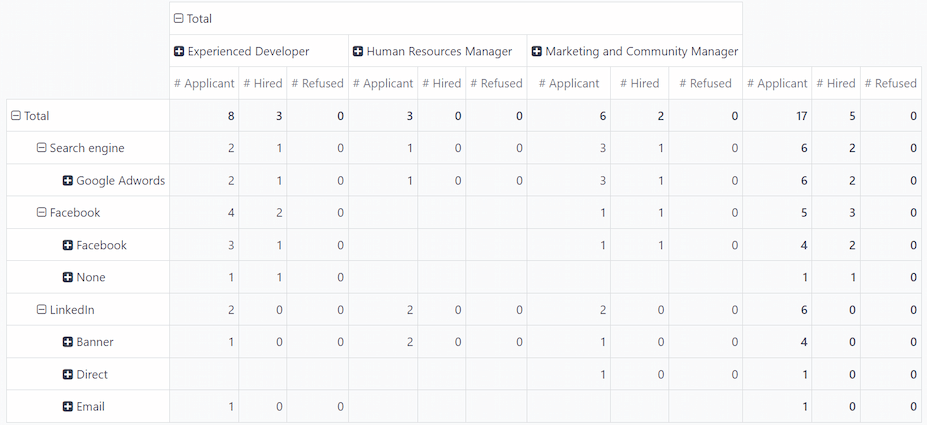
Source analysis
Los informes son una herramienta indispensable para los departamentos de reclutamiento, pues les permiten obtener información sobre todo el proceso de contratación.
Determinar de dónde provienen los postulantes puede proporcionarle información muy útil relacionada con el origen que le proporciona los mejores resultados. Esta información se obtiene mediante el informe de análisis de origen y, gracias a estos datos, los equipos de reclutamiento pueden ajustar sus estrategias de contratación para que apliquen mejores (y más) postulantes.
Abrir el informe
Para acceder al informe de análisis del origen, vaya a .
This presents the data for the last 365 days in a default (Stacked) (Bar Chart) view. It shows the amount of applicants by source and separated by status (In Progress, Hired, and Refused),
Hover the cursor over any color-coded section of a column to view the specific numbers for that status column.

Informe de eficacia del origen
To identify which sources (e.g., job boards, social media, employee referrals, company website) produce the most hires, the pivot table view of the Source Analysis report can be configured to display further details.
To view the Source Analysis report in a pivot table, click the (Pivot) icon in the corner. The data is presented in a pivot table, with rows populated by sources, and columns populated by stages.
To expand this chart to show what specific job positions the applicants applied to from each source, click the Total box above the columns to reveal a drop-down menu, and click Job Position.
Each column is then grouped by the job position, such as Accountant or Carpenter. Each job position displays a separate count for applications In Progress, Refused, or Hired, and an Applications column which displays the total count of all statuses.

Medio
Es muy útil saber cuál es el medio por el que los postulantes encuentran un puesto, ya que así sabrá cual de ellos tiene más éxito.
Mediums are the specific methods the applicant used to discover and then apply for job positions, such as a search engine, social media ad, email, banner, etc.
To further group the results by medium, click into one of the (Source) rows then click Medium in the resulting drop-down menu. The row presents the individual mediums relevant to that specific source.
Una vez que selecciona un medio, al hacer clic en otra fila, aparecerán las métricas específicas para el mismo.
Nota
The only mediums that appear for a source are mediums that have been set on an applicant’s form. If a medium has not been set for any applicants, the medium does not appear in the drop-down rows beneath the source.
Por ejemplo, si ningún postulante aplicó con el medio Google Adwords, ese medio no aparecerá abajo de la fila de origen de motor de búsqueda.