Skip to Content
Odoo Menu
  • Log ind
  • Prøv gratis
  • apps
    Økonomi
    • Bogføring
    • Fakturering
    • Udgifter
    • Regneark (BI)
    • Dokumenter
    • e-Signatur
    Salg
    • CRM
    • Salg
    • POS Butik
    • POS Restaurant
    • Abonnementer
    • Udlejning
    Hjemmeside
    • Hjemmesidebygger
    • e-Handel
    • Blog
    • Forum
    • LiveChat
    • e-Læring
    Forsyningskæde
    • Lagerbeholdning
    • Produktion
    • PLM
    • Indkøb
    • Vedligeholdelse
    • Kvalitet
    HR
    • Medarbejdere
    • Rekruttering
    • Fravær
    • Medarbejdersamtaler
    • Anbefalinger
    • Flåde
    Marketing
    • Markedsføring på sociale medier
    • E-mailmarketing
    • SMS-marketing
    • Arrangementer
    • Automatiseret marketing
    • Spørgeundersøgelser
    Tjenester
    • Projekt
    • Timesedler
    • Udkørende Service
    • Kundeservice
    • Planlægning
    • Aftaler
    Produktivitet
    • Dialog
    • Godkendelser
    • IoT
    • VoIP
    • Vidensdeling
    • WhatsApp
    Tredjepartsapps Odoo Studio Odoo Cloud-platform
  • Brancher
    Detailhandel
    • Boghandel
    • Tøjforretning
    • Møbelforretning
    • Dagligvarebutik
    • Byggemarked
    • Legetøjsforretning
    Mad og værtsskab
    • Bar og pub
    • Restaurant
    • Fastfood
    • Gæstehus
    • Drikkevareforhandler
    • Hotel
    Ejendom
    • Ejendomsmægler
    • Arkitektfirma
    • Byggeri
    • Ejendomsadministration
    • Havearbejde
    • Boligejerforening
    Rådgivning
    • Regnskabsfirma
    • Odoo-partner
    • Marketingbureau
    • Advokatfirma
    • Rekruttering
    • Audit & certificering
    Produktion
    • Tekstil
    • Metal
    • Møbler
    • Fødevareproduktion
    • Bryggeri
    • Firmagave
    Heldbred & Fitness
    • Sportsklub
    • Optiker
    • Fitnesscenter
    • Kosmetolog
    • Apotek
    • Frisør
    Håndværk
    • Handyman
    • IT-hardware og support
    • Solenergisystemer
    • Skomager
    • Rengøringsservicer
    • VVS- og ventilationsservice
    Andet
    • Nonprofitorganisation
    • Miljøagentur
    • Udlejning af billboards
    • Fotografi
    • Cykeludlejning
    • Softwareforhandler
    Gennemse alle brancher
  • Community
    Få mere at vide
    • Tutorials
    • Dokumentation
    • Certificeringer
    • Oplæring
    • Blog
    • Podcast
    Bliv klogere
    • Udannelselsesprogram
    • Scale Up!-virksomhedsspillet
    • Besøg Odoo
    Få softwaren
    • Download
    • Sammenlign versioner
    • Udgaver
    Samarbejde
    • Github
    • Forum
    • Arrangementer
    • Oversættelser
    • Bliv partner
    • Tjenester til partnere
    • Registrér dit regnskabsfirma
    Modtag tjenester
    • Find en partner
    • Find en bogholder
    • Kontakt en rådgiver
    • Implementeringstjenester
    • Kundereferencer
    • Support
    • Opgraderinger
    Github Youtube Twitter LinkedIn Instagram Facebook Spotify
    +1 (650) 691-3277
    Få en demo
  • Prissætning
  • Hjælp

Odoo is the world's easiest all-in-one management software.
It includes hundreds of business apps:

  • CRM
  • e-Commerce
  • Bogføring
  • Lager
  • PoS
  • Projekt
  • MRP
All apps
Du skal være registreret for at interagere med fællesskabet.
All Posts People Emblemer
Tags (View all)
odoo accounting v14 pos v15
Om dette forum
Du skal være registreret for at interagere med fællesskabet.
All Posts People Emblemer
Tags (View all)
odoo accounting v14 pos v15
Om dette forum
Hjælp

Unable to match invoices to payments. odoo18.

Tilmeld

Få besked, når der er aktivitet på dette indlæg

Dette spørgsmål er blevet anmeldt
accountingjournalpaymentsodooon-premise
2 Besvarelser
6744 Visninger
Avatar
Rad Zie

Hi Everyone,

I am testing new odoo 18 instance on-premise.

I have added all needed journals: Card, Bank, Cash.

I first saw the problem while creating the first invoice. Whatever I do there is always Amount Due at the bottom. No payment to match / reconcile with it. I can click on Pay button and take payments x times. Payment is not adding towards invoice amount due. I can see all those payments linked in the box at the top! But invoice stay with due amount untouched.

Same customer, same memo under payment details. 

What I have found so far: 

  1. Payments DOES NOT register in the Journal Entry ! Only invoices are visible in the Journal. No filters applied. 
  2. The only place I can see the payments is the : Accounting->Customers->Payments
  3. All the payments have sequence start with PAYxxxxx not CSH1/2024/00001 or BNK1/2024/00001 

On the tutorial movies about accounting in odoo18 all seem to work all right. So it has to be my configuration. It's quite new instance, but I have no idea where to look now and I dont know what else should I add to you to resolve it.


Please help as I have not seen such behaviour in odoo 17.


0
Avatar
Kassér
ChrisB_USA

I am also very interested in a response to this post. I have run into the same situation. Additional information on my instance is that it is Community Edition. I have found indications (from Meta AI answers) that the recording of payments has been simplified in Odoo 18 but I have not found any official documentation or details.

I can see in the Odoo database that there is now an account_payment table, and payments are recorded there, and NOT in the account_move and account_move_line tables.

Is this possibly incomplete in the Community edition?

Ray Carnes (ray)

Payments now only have Journal Entries when reconciled. If you prefer the previous way of working add Outstanding Accounts to your Payment Journals and Entries will be created. With this optional configuration things will work like they did before.

nebuloniangelo

OK

Vpsi

Bonne réponse Rad Zie Merci

Avatar
Rad Zie
Forfatter Bedste svar

Hi all, 

I manage to get Invoice payments to work in Odoo 18 as it was in Odoo 17.

As Ray said, you need to do some additional work and the official Odoo 18 documentation is not yet revised. 

This is what I did:

1. Go to: Accounting -> Configuration -> Chart of Accounts


2. Create two new accounts : "Outstanding Receipts" and "Outstanding Payments". Type: Current Assets. Allow Reconciliation: Yes. I used codes: 120003 and 120004.


3. Go to: Accounting -> Configuration -> Journals


4. Open Journal you want to use the intermediate "Outstanding" account. Here I choose CASH.


5. Click the Incoming Payments tab and choose our new 120003 Outstanding Receipts account in Outstanding Receipts accounts column.


6. Click the Outgoing Payments tab and choose our new 120004 Outstanding Payments account in Outstanding Receipts accounts column.


Done.

Now if you click the PAY button in the invoice view, the payment will be created in the Journal and automatically reconciled with the invoice.

These Outstanding accounts must then be reconciled with the actual bank entries to mark the invoice as PAID, which is a standard and familiar procedure.

You must repeat this process for each payment method (Journal) required: Card, Cash, Bank, Stripe, etc. You may use the same 120003 / 120004 Outstanding accounts or create a new pair for each payment (Journal).


I hope this will help you until the Odoo documentation is updated.


Best regards,

Radoslaw Ziegler

3
Avatar
Kassér
Kylie Grant

Rad Zie, thank you very much for sharing this solution.

Ray Carnes (ray)

What a great answer

Adham Samy

What if I don't want to use an outstanding account?

Avatar
François Goethals
Bedste svar

Hi Rad,

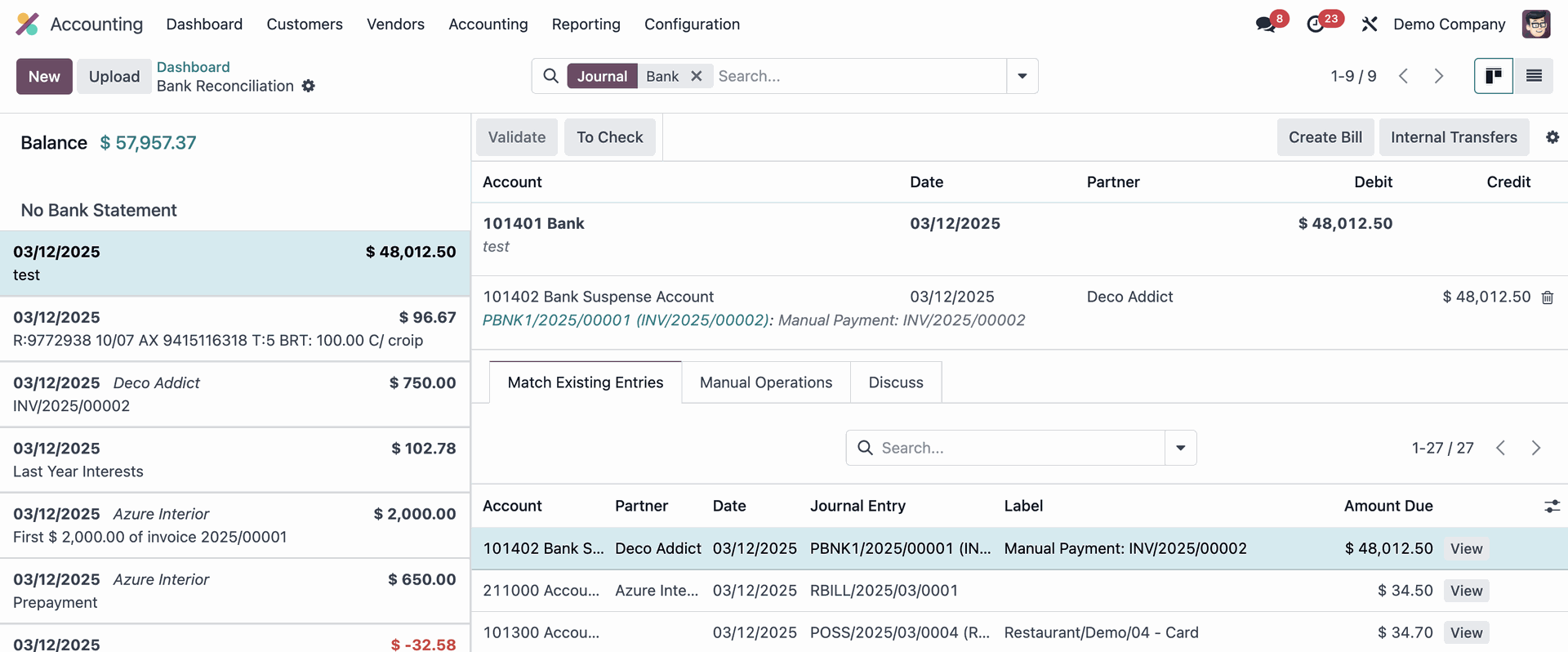
All you said is correct, but I notice the reconciliation panel is broken when outstanding accounts are used.

Despite the two amounts matches and shall be reconciled, the "Validate" button remains forever disabled.

Any solution to that ?

Jérôme

0
Avatar
Kassér
Ray Carnes (ray)

The Bank Suspense Account is already used during reconciliation. You can't use it as an Outstanding Account. Create a dedicated Account or Accounts.

Enjoying the discussion? Don't just read, join in!

Create an account today to enjoy exclusive features and engage with our awesome community!

Tilmeld dig
Related Posts Besvarelser Visninger Aktivitet
Add custom filter in financial reports odoo17
accounting odoo
Avatar
Avatar
Avatar
3
jan. 25
7777
Odoo 16 - Customer Payments - Allocate Payment to Invoices per Customer Remittance
accounting payments
Avatar
0
jul. 23
3446
concatenate another field with label in account.move.line Løst
accounting odoo
Avatar
Avatar
1
aug. 24
5091
What is the purpose of Journal Groups in Odoo Accounting?
accounting journal
Avatar
Avatar
Avatar
2
jun. 23
5512
Argentine Localization - Payments error
accounting payments
Avatar
0
jun. 22
2714
Community
  • Tutorials
  • Dokumentation
  • Forum
Open Source
  • Download
  • Github
  • Runbot
  • Oversættelser
Tjenester
  • Odoo.sh-hosting
  • Support
  • Opgradere
  • Individuelt tilpasset udvikling
  • Uddannelse
  • Find en bogholder
  • Find en partner
  • Bliv partner
Om os
  • Vores virksomhed
  • Brandaktiver
  • Kontakt os
  • Stillinger
  • Arrangementer
  • Podcast
  • Blog
  • Kunder
  • Juridiske dokumenter • Privatlivspolitik
  • Sikkerhedspolitik
الْعَرَبيّة Català 简体中文 繁體中文 (台灣) Čeština Dansk Nederlands English Suomi Français Deutsch हिंदी Bahasa Indonesia Italiano 日本語 한국어 (KR) Lietuvių kalba Język polski Português (BR) română русский язык Slovenský jazyk slovenščina Español (América Latina) Español ภาษาไทย Türkçe українська Tiếng Việt

Odoo er en samling open source-forretningsapps, der dækker alle dine virksomhedsbehov – lige fra CRM, e-handel og bogføring til lagerstyring, POS, projektledelse og meget mere.

Det unikke ved Odoo er, at systemet både er brugervenligt og fuldt integreret.

Website made with

Odoo Experience on YouTube

1. Use the live chat to ask your questions.
2. The operator answers within a few minutes.

Live support on Youtube
Watch now