
Hello I want to change complete background color for pdf report in odoo17
Odoo is the world's easiest all-in-one management software.
It includes hundreds of business apps:
- CRM
- e-Commerce
- Akuntansi
- Inventaris
- PoS
- Project
- MRP
Pertanyaan ini telah diberikan tanda
2
Replies
996
Tampilan


Hi,
In Odoo 17, PDF reports are generated using QWeb templates and rendered via wkhtmltopdf. To change the complete background color of a report, you need to extend the report’s QWeb template and apply CSS styles that wkhtmltopdf can understand.
Option 1: Locate or inherit the report template
If it’s a standard report (like invoice, sale order, etc.), find the QWeb template in the corresponding module (e.g., account.report_invoice_document). For custom reports, inherit your template.
<template id="report_invoice_background" inherit_id="account.report_invoice_document">
<xpath expr="//div[@class='page']" position="attributes">
<attribute name="style">background-color:#f0f0f0; color:#000000;</attribute>
</xpath>
</template>
Option 2: Use CSS for full-page background
You can also add a CSS block to target the whole page of the report:
<template id="report_invoice_background" inherit_id="account.report_invoice_document">
<xpath expr="//t[@t-name='account.report_invoice_document']" position="before">
<style>
@page {
background-color: #f0f0f0;
}
body {
background-color: #f0f0f0 !important;
}
.page {
background-color: #f0f0f0 !important;
min-height: 100%;
}
</style>
</xpath>
</template>
Update your module (-u module_name).
Regenerate the report.
For more information:
* https://www.cybrosys.com/blog/how-to-customize-existing-reports-in-odoo-18
* https://www.cybrosys.com/blog/how-to-customize-existing-reports-in-odoo-17
Hope it helps

Hello,
Yes you can, by changing it inside the settings menu. First you need to go to Settings > Activate Debug menu. then, go back to settings > technical > views and search for report_invoice_document
inside the box you can add <div style="background-color: yellow;"> under the t-call element. Dont forget to add </div> closing bracket at the bottom like this image

However, this color change will affect the inner box of the invoice only. You will need to add another element code to other files, for example the external_layout_standard to change the outer line of the invoice report boxes.
I'd recommend to use the paper with exact color you want instead, as its will save you some printer ink supplies
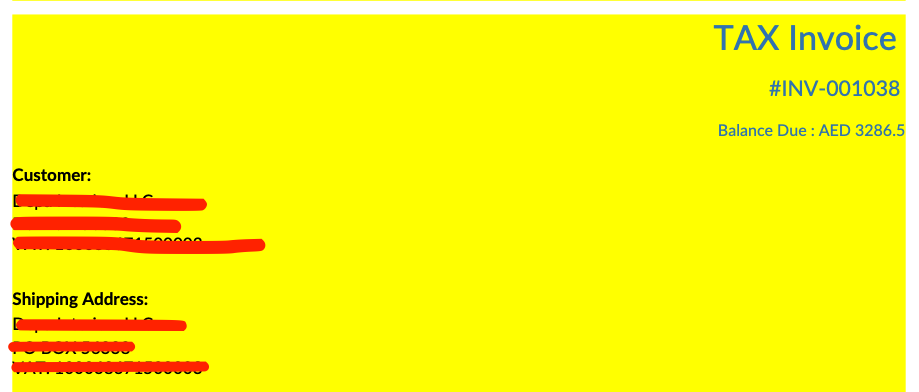
Hope this helps!
Altela (altelasoftware.com)
Menikmati diskusi? Jangan hanya membaca, ikuti!
Buat akun sekarang untuk menikmati fitur eksklufi dan agar terlibat dengan komunitas kami!
Daftar