
Optimisation des moteurs de recherche (SEO)
L’optimisation des moteurs de recherche, souvent appelée SEO, est une stratégie de marketing digital visant à améliorer la visibilité et le classement d’un site web dans les résultats de moteurs de recherche (par ex. Google). Il s’agit d’optimiser divers éléments de votre site web, notamment son contenu, le partage sur les réseaux sociaux, les URL, les images et la vitesse de défilement des pages.
Note
Optimisation du contenu
Pour optimiser le SEO d’une page web, accédez à la page, puis allez dans .
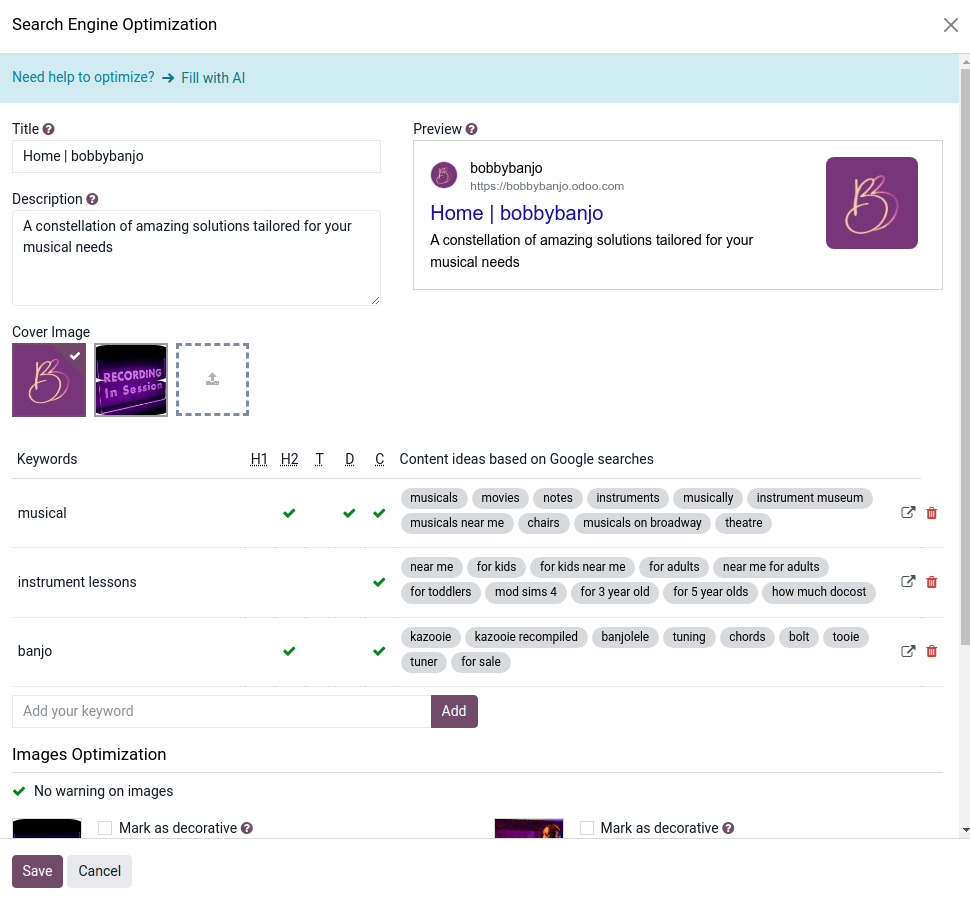
Note
Changing the title of a blog post or the name of a product automatically updates the link to the related webpage. The old link still functions as a 301 redirect is created, maintaining the SEO.
Astuce
Click Fill with AI to automatically generate a meta title, a description, and get keyword suggestions.
Remove incorrect URLs from the Broken Link field and select valid ones to prevent errors.
In-text keywords
In-text keywords appear naturally throughout a page’s visible content (titles, headings, and body text) and help search engines determine the topic and relevance of the page. These keywords have a real impact on ranking. They cannot be edited in the optimize SEO pop-up.
Important
Il est fortement recommandé de n’utiliser qu’un seul titre H1 par page pour le SEO.
Images
La taille des images a un impact significatif sur la rapidité de la page. Il s’agit d’un critère essentiel pour les moteurs de recherche afin d’optimiser le classement SEO.
Astuce
Comparez le classement de votre site web en utilisant Google Page Speed ou Pingdom Website Speed Test.
Odoo automatically compresses uploaded images and converts them to Webp. With this file format,
photos are smaller, which increases the page loading speed and, therefore, gives a better ranking in
SEO. All images used in Odoo official themes are also compressed by
default.
Note
Third-party themes may not compress images efficiently.
To modify an image from a webpage, select the image, click Edit, then go to the Customize tab, and adapt the Format in the Image section.
Important
Les balises Alt sont utilisées pour fournir un contexte au contenu d’une image, afin d’informer les moteurs de recherche et de leur permettre d’indexer correctement l’image. L’ajout de mots-clés dans le champ Description est essentiel du point de vue SEO. Cette description est ajoutée au code HTML de votre image et s’affiche lorsque l’image ne peut pas être affichée.
Indexation
Website indexation is the process by which search engines, such as Google, discover, analyze, and store information about a website’s content in their database. Search engine bots, known as crawlers or spiders, visit web pages and follow links to collect data, including text, images, and other media. The purpose of indexation is to make a website’s content searchable and discoverable to users. Without being indexed, a website or a specific page on that site will not appear in search engine results, regardless of how relevant or well-designed it is. Indexation is a fundamental step in SEO, serving as the foundation for a website’s visibility and organic traffic.
Note
When you first create your website on Odoo, it will not appear directly in search engine results. Search engines need time to crawl and index it, which can take anywhere from a few days to several weeks. For Google, you can use the Search Console and request indexing for specific URLs, though this does not guarantee faster results. If you have an existing website and are migrating, your previous website may still appear instead of the new one during that timeframe.
SEO impact when migrating your existing website to Odoo
In most cases, migrating to Odoo will not negatively impact the website’s SEO. While no platform can guarantee that rankings will remain unchanged, follow these best practices to significantly reduce the risk.
Keep the existing content.
Implement redirects from old URLs to their new counterparts.
Monitor traffic and indexation to make sure that everything is going well, using Console Google Search.
By doing this, search engines reindex the site and maintain its visibility in search results.
Note
It is normal to experience a traffic decrease in the first days.
Prevent a page from being indexed
To effectively prevent a page from appearing in search engine results, use one of the following methods:
noindex tag: Access the page’s properties and toggle the Indexed switch off.
Note
This option is not yet available for dynamic pages.
404 or 403: Configure the page to return a 404 (Not Found) or 403 (Forbidden) HTTP status code. These codes signal to search engines that the page does not exist or is inaccessible, leading to its eventual removal from the index.
403: Access the page’s properties and toggle the Visibility switch off or unpublish the page.
Google Search Console: Use Google Search Console to request the removal of specific URLs from Google’s index.
Voir aussi
Prevent a website from being indexed
To prevent a website from appearing in search engine results, go to , then in the Website Info section, add a random value in the Domain field. Doing so automatically inserts the following tag into the page source:
<meta name="robots" content="noindex"/>
This tag instructs search engines not to index the site. After applying the change, it may take several days or weeks for search engines to update their results and remove the website.
Example
This can be used to prevent websites from test databases from appearing in search results.
Plan du site
The sitemap points out website pages and their relation to each other to search engine crawlers.
Odoo generates a /sitemap.xml file, including all URLs. For performance reasons, this file is
cached and updated every 12 hours.
Note
Si votre site web a beaucoup de pages, Odoo crée automatiquement un fichier d’indexation plan de site en suivant le protocole sitemaps.org, qui regroupe les URL en 45000 fragments par fichier.
Chaque entrée sur le plan du site possède trois attributs qui sont calculés automatiquement :
<loc>: l’URL d’une page.<lastmod>: date de la dernière modification d’une ressource, calculée automatiquement en fonction de l’objet associé. Pour une page liée à un produit, il peut s’agir de la date de la dernière modification du produit ou de la page.<priority>: les modules peuvent implémenter leur propre algorithme de priorité en fonction de leur contenu (par exemple : un forum pourrait assigner une priorité en fonction du nombre de votes sur un post en particulier). La priorité d’une page statique est définie par son champ priorité, qui est normalisé (16 par défaut).
Astuce
To prevent pages from appearing in a sitemap, go to , and toggle off the Indexed feature.

robots.txt
A robots.txt file instructs search engine crawlers which parts of a website they are permitted to
access. Its primary purpose is to:
Prevent overloading the website: By guiding crawlers away from certain sections, robots.txt helps manage server load.
Control access to resources and detailed descriptions: It can prevent crawlers from accessing media files (images, videos), CSS stylesheets, and JavaScript files, and from reading the content (text) of specific pages.
When indexing your website, search engines first look at the robots.txt file. Odoo automatically
creates one robot.txt file available on mydatabase.odoo.com/robots.txt.
Note
Reputable bots adhere to robots.txt; others may require blocking via Cloudflare on your custom domain.
Editer robots.txt
En modifiant un fichier robots.txt, vous pouvez contrôler quelles pages du site sont accessibles aux robots des moteurs de recherche. Pour ajouter des instructions personnalisées au fichier, allez dans , descendez jusqu’à la section SEO, et cliquez sur Modifier robots.txt.
Example
If you do not want robots to crawl the /about-us page of your site, you can edit the
robots.txt file to add Disallow: /about-us.
Important
While robots.txt prevents content from being crawled, it does not guarantee that a page
will not be indexed. A page can still appear in search results if it is linked to from other
crawled pages (indexed by « reference »). Google generally does not recommend using robots.txt to
block webpages that you wish to keep out of search results entirely.
Fonctionnalités avancées
Balisage des données structurées
Structured data markup is used to generate rich snippets in search engine results. It is a way for websites to send structured data to search engine crawlers, helping them understand your content and create well-presented search results.
Google prend en charge par défaut de nombreux snippets enrichis pour les types de contenu, notamment les avis, les personnes, les produits, les entreprises, les événements et les organisations.
Les microdonnées sont un ensemble de balises, lancées avec HTML5, qui aident les moteurs de recherche à mieux comprendre votre contenu et à l’afficher de manière pertinente. Odoo utilise des microdonnées telles que décrites dans la spécification schema.org pour les événements, les produits eCommerce, les messages de forum et les adresses de contact. Cela permet à vos pages de produits d’être affichées dans Google en utilisant des informations supplémentaires telles que le prix et l’évaluation d’un produit :
